

Phorion's advisory of 30 October 2026 described how compromised versions of the official Claude Code extension, 2.1.312 and 2.1.313, were distributed through Cursor's extension marketplace. To vet VS Code extensions for a team, maintain an extension inventory, allowlist approved publishers and versions, delay updates until they have been checked, and treat a compromised extension as a potential compromise of the entire device.
Key facts
| Question | Answer | Source |
|---|---|---|
| What was affected? | Versions 2.1.312 and 2.1.313 of the Claude Code extension were distributed through Cursor's marketplace using Anthropic's legitimate extension ID. The affected versions were subsequently removed. | Cursor, Microsoft Threat Intelligence |
| What did the malicious code do? | A loader inserted before the extension's legitimate code attempted to install an SSH key, establish a reverse SSH tunnel, create persistence and report information about the affected computer. | Phorion, StepSecurity |
| Were copies on Open VSX affected? | Open VSX had no version 2.1.313. Its version 2.1.312 was published on 27 October, two days before the reported incident. | Open VSX registry record |
| Why can one extension create a security risk? | VS Code extensions run with the same permissions as the editor. This can allow them to access files, make network requests and execute processes. | VS Code docs |
| Does Workspace Trust prevent malicious extensions? | No. Workspace Trust restricts certain workspace-related actions, but it cannot prevent a malicious extension from executing its own code or ignoring Restricted Mode. | VS Code docs |
| What can teams enforce? | Teams can use policies to restrict extensions to approved publishers, extension IDs and versions in both VS Code and Cursor. | VS Code docs, Cursor docs |
| Why delay extension updates? | VS Code has a default 12-hour delay before automatically installing updates. Cursor's team installation cooldown defaults to zero, meaning no delay is applied unless administrators configure one. | VS Code docs, Cursor docs |
In this article
- What happened to the Claude Code extension on the Cursor Marketplace?
- Are you affected, and what should you do today?
- How do editor extensions actually run, and why is a marketplace a supply chain?
- How should a small team vet VS Code extensions before installing them?
- How do you enforce an extension policy across a team?
- What does a compromised extension mean for your code and keys?
- Conclusion
- Frequently asked questions
What happened to the Claude Code extension on the Cursor Marketplace?
On 29 October 2026, Cursor's extension marketplace served tampered versions of the official Claude Code extension. The affected builds were 2.1.312 and 2.1.313, and Cursor removed them the same day. Both carried an extra loader that tried to give an attacker a way back into the developer's machine.
Cursor's security notice says the malicious version was available "between about 2:27am PT and 1:35pm PT". That works out to a window of 11 hours and 8 minutes. According to Cursor, the loader collected host and user details. It also tried to add an attacker's SSH key to authorized_keys, and it tried to enable the local SSH service and open a reverse tunnel. Finally, it tried to make that tunnel persistent.
Cursor told reporters the exposure was "at most 5,000 users". BankInfoSecurity repeats this figure from the same statement. The time window and the user figure both come from Cursor, and nobody outside the company has measured either.
Most people first read the story in a write-up from the endpoint security firm Phorion. Phorion sells a Mac security agent, so it has an interest in the story. Its post was submitted to Hacker News at 07:09 UTC on 30 October and has since reached 1,011 points. The post's revision history shows it went up at 05:30 UTC. At 09:13 UTC it was corrected to name the Cursor marketplace. At 00:43 UTC on 31 October it gained version 2.1.312.
| When (UTC) | Who | What happened |
|---|---|---|
| 27 Oct, 20:26 | Open VSX | Anthropic's genuine 2.1.312 is published there |
| 29 Oct | Cursor | Tampered 2.1.312 and 2.1.313 are served from its marketplace, then removed |
| 30 Oct, 01:07 | Open VSX | Anthropic publishes 2.1.314 there; the Visual Studio Marketplace builds follow from 01:16 |
| 30 Oct, 07:09 | Hacker News | Phorion's advisory is submitted |
| 30 Oct, 14:08 | Hacker News | Anthropic's Felix Rieseberg comments that Anthropic's systems were not compromised |
| 30 Oct, 18:30 | Cursor | Notice updated (11:30 Pacific) with new indicators and clarified versions |
| 31 Oct, 00:43 | Phorion | Advisory adds version 2.1.312 |
Was Anthropic, Open VSX or the Microsoft marketplace compromised?
No, on the evidence so far. The compromise sat inside Cursor's marketplace, and several sources agree on this.
Anthropic's Felix Rieseberg wrote on Hacker News that "it wasn't a compromise of Anthropic's systems or employee laptops". He said a malicious actor used access to Cursor's marketplace to publish a tampered copy of the extension. Microsoft Threat Intelligence says it confirmed the malicious packages were never published or distributed from the Visual Studio Marketplace or through npm.
Early reporting was less certain. OpenSourceMalware first said it had been told the infection came through Open VSX. After Cursor contacted it, the site added an update saying the compromise was in the Cursor marketplace, "not Open VSX." A Hacker News submission linking a DoublePulsar post also got 399 points. That post sits behind a bot wall, so it was not read for this article.
Part of this can be checked directly, because registries publish machine-readable records. Open VSX lists version 2.1.312 with a publish time of 27 October at 20:26 UTC. It has no version 2.1.313 at all, and asking for it returns "Extension not found."
The checksums also differ. The checksum Open VSX publishes for its Apple Silicon 2.1.312 package begins b851e43b. The tampered 2.1.312 that Cursor lists for the same platform begins fcbb327e. That is the same name and version number, but two different files.
StepSecurity reached the same conclusion by downloading Open VSX's 2.1.312 and verifying that it was clean. It also reports that Anthropic confirmed 2.1.313 was never published to Open VSX or Microsoft's marketplace. According to StepSecurity, Anthropic skipped to 2.1.314 to avoid confusion.
The tampered file was not a rewrite. StepSecurity recovered the sample from a malware repository. It says the malicious extension.js is the clean 2.1.312 file with a single 7,386-byte loader spliced in front. It adds that the bundle inside the "2.1.313" package still calls itself 2.1.312. OpenSourceMalware likewise found that the bundled binary was the official one, and that only extension.js and the manifest differed. So the attacker started from Anthropic's real build. Bumping the manifest to 2.1.313 is consistent with making it look like a newer release.
How the attacker got in is still unexplained. Phorion's chief technology officer told Ars Technica that 2.1.313 was "posted to the official Anthropic account," as relayed by The Next Web. Cursor's notice says only that a modified version "was made available." As of 5 November, we found no public explanation from Cursor or Anthropic. Cursor's notice was last updated on 30 October, and CSO Online reported on 2 November that neither company had responded to its requests for comment. This unknown shapes the rest of the article. It is possible to say which controls would have blunted the incident, but not which one the attacker bypassed.
How bad was it, really?
For most machines, the loader planted a key, wrote persistence and reported in. The remote-access step usually failed, though. Cursor says that errors in the malicious code meant enabling the local SSH service would fail, except in "highly unusual circumstances where Cursor was started with administrator privileges." On most macOS and Windows hosts, the attacker therefore could not have logged in through the tunnel.
Phorion found the macOS bug. The script reads the Remote Login setting without administrator rights. It gets an error message back instead of the word "Off", so it never tries to switch SSH on.
This reassurance has two limits. First, the key and the persistence were still written. Phorion says that if the user already had Remote Login enabled, or turns it on later, "the backdoor is ready and waiting."
Second, the beacon went out regardless. It carried the hostname, username, home directory, global Git email and public IP. It also carried up to 40 environment variable names containing words such as KEY, TOKEN, SECRET, PASS, AWS or GCP. Microsoft stresses that these are names, not values, and that the beacon "does not demonstrate theft of the secrets." Cursor adds that the "limited env-var collection does not rule out later credential access over the backdoor."
Cursor reports that the attacker's server has been taken offline with the hosting provider's help. It also says it shut down the marketplace. It then rotated its keys and rebuilt the marketplace.
Are you affected, and what should you do today?
First, find out whether anyone on your team installed or updated the Claude Code extension in Cursor on 29 October 2026. That is the channel and the day the tampered builds were served. The fastest follow-up test is to search for an SSH key whose comment is svc-telemetry, the label the loader gave its planted key.
Having 2.1.312 or 2.1.313 installed proves nothing by itself. StepSecurity says to check where the copy came from and when it arrived. A 2.1.312 from Open VSX or Microsoft's marketplace is Anthropic's genuine build.
Cursor limits the incident to macOS and Windows installs or updates from its marketplace during the window. The loader also contains Linux code, though. A Linux machine that took the update in Cursor deserves the same checks.
Work through these steps for each machine, and keep notes as you go.
- Take inventory. Ask each developer for their extension list with versions. In VS Code, the command is
code --list-extensions --show-versions. The folder name shows the build, for exampleanthropic.claude-code-2.1.313-darwin-arm64. - Look for the planted key. On macOS, Cursor's check is
grep -qs svc-telemetry ~/.ssh/authorized_keys. On Windows, look in your user.ssh\authorized_keysfile. Also look inC:\ProgramData\ssh\administrators_authorized_keys, which Microsoft's OpenSSH documentation names as the file administrators use. A missing marker alone is not an all-clear. Also check for the LaunchAgent, the hidden~/.config/.smtscript and aSysMonscheduled task. - Isolate any machine with a hit. Disconnect it before you clean it. Preserve evidence first, as Microsoft advises.
- Remove everything, not only the extension. Phorion warns that "uninstalling the extension alone won't remove the backdoor." Cursor publishes remediation scripts for macOS and Windows. Read them before you run them.
- Rotate credentials from a clean machine. Cursor's wording is "credentials and sessions accessible from affected hosts, from a trusted system." Start with SSH keys and cloud CLI keys. Then move on to source-control tokens and package-registry tokens. Finish with anything in
.envfiles. - Decide whether to rebuild. Cursor says to "assess whether the host should be rebuilt." If you cannot show what ran, rebuild.
If nobody on your team used Cursor on 29 October, you are not affected by this incident. You are still exposed to the next one, though. A server-side flaw is something you patch. This is code a developer chose to install, where the fix is a rebuild and a rotation.
How do editor extensions actually run, and why is a marketplace a supply chain?
An editor extension is ordinary Node.js code that runs with the editor user's full permissions. A marketplace is the registry that decides which of that code reaches your developers. VS Code's documentation says the extension host has the same permissions as VS Code itself. An extension can therefore read and write files, make network requests, run external processes and change workspace settings.
What does the extension host actually restrict?
It is built to protect the editor's performance, not your machine. The extension host documentation says extensions run in a local Node.js process, a browser web worker or a remote Node.js host. It also says the host stops extensions from slowing startup or the UI, and from modifying the UI. Extensions declare activation events so that they load lazily, which is a stability feature. Nothing in that description is a permission boundary.
That matters for how the loader worked. Phorion says the injected function runs "as soon as Node loads the file, before the extension's normal activate callback even runs." The developer never has to click anything. OpenSourceMalware also found that the package declares no install or build scripts. This attack needed only a module load.
Many people assume Workspace Trust covers this, but it does not. Restricted Mode stops automatic code execution from a folder you opened. It does this by disabling or limiting the terminal, tasks, debugging, workspace settings and any extensions that have not opted in. The same page warns that Workspace Trust "can't prevent a malicious extension from executing code and ignoring Restricted Mode." It defends you against a hostile repository, not a hostile extension.
The extension author guide adds that an extension with no main entry point, such as a theme, runs no code and needs no trust. Claude Code's extension does have code. Its registry record declares that it runs where the workspace is.
How do the marketplaces differ?
Three registries sit behind the editors your team probably uses, and each checks different things.
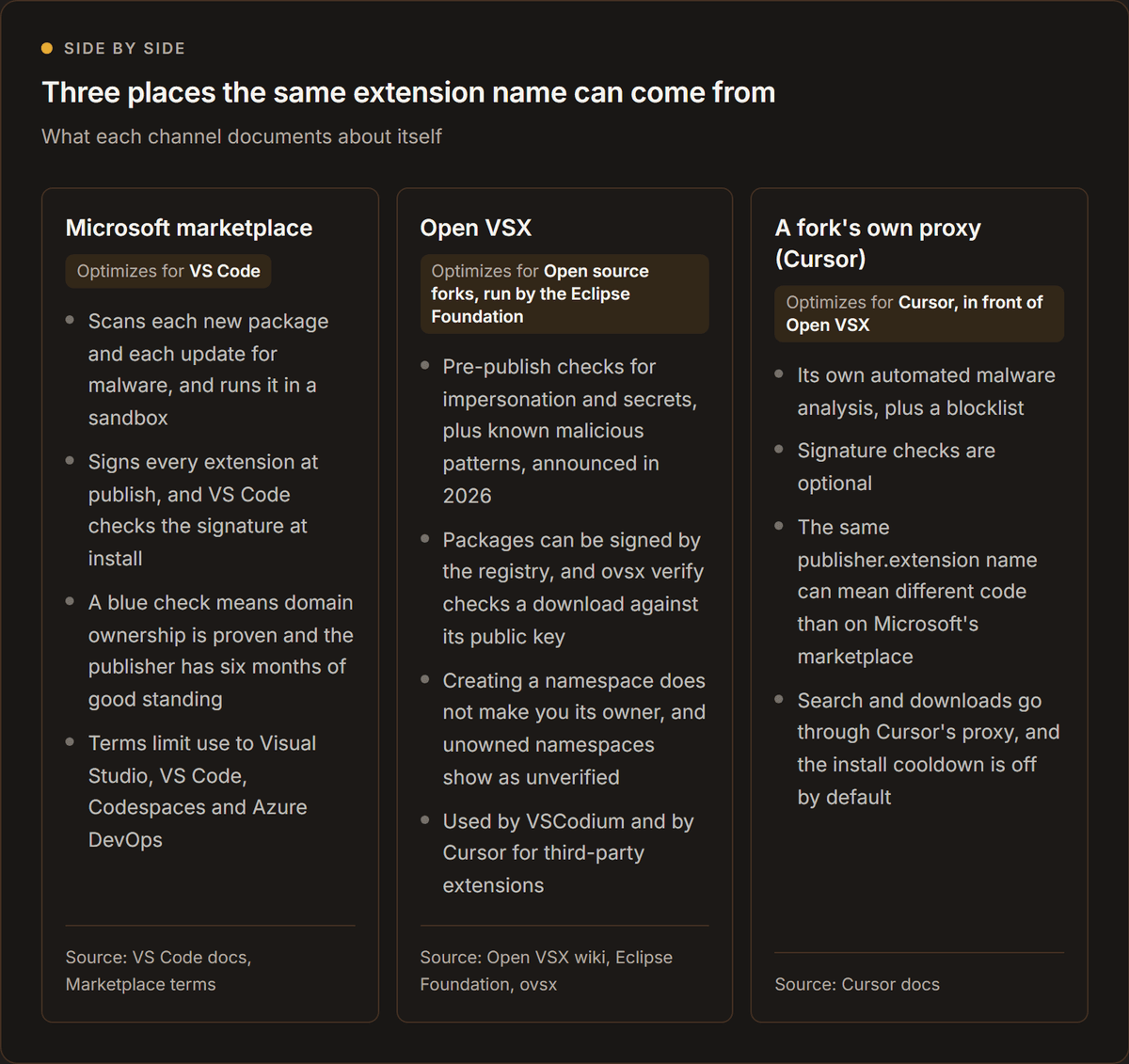
The Microsoft marketplace is the best documented. VS Code's security page lists malware scanning on each new extension and update. It also describes dynamic detection in a sandboxed clean-room VM, and blocks on name-squatting. A block list makes VS Code uninstall an extension that has been removed. Signatures are verified at install. A Microsoft engineering post from June 2025 says its team had reviewed 136 extensions for malicious code so far that year and removed 110. That is the platform describing its own work, not an audit.
Forks have a structural problem. The Marketplace terms of use say the offerings are "intended for use only with In-Scope Products and Services." That list names Visual Studio, Visual Studio Code, GitHub Codespaces and Azure DevOps. VSCodium says Microsoft "prohibits usages of the Microsoft marketplace by any other products", so it defaults to Open VSX. Cursor moved its extension library to Open VSX in June 2025.
Open VSX is run by the Eclipse Foundation, and its model differs from Microsoft's. Its namespace documentation says that when you create a namespace, "you are not automatically the owner of that namespace." Its publishing guide says one access token "can be used to publish as many extensions as you like, until it is deleted."
In January 2026 the Foundation said the registry "has relied primarily on post-publication response and investigation." It announced pre-publish checks for impersonation and leaked secrets. The checks would also look for known malicious patterns. The Hacker News reported monitor-only mode in February 2026, with enforcement due the following month.
Signing exists on Open VSX too, but it proves less than you might hope. The ovsx tool's documentation says ovsx verify checks a download against the registry's public key. A failure means "the package was not published by, or was tampered with after being published by, the registry it was downloaded from." The signature proves the registry's stamp. It does not prove that the registry's own gate was sound.
Cursor sits in front of all this. Its extensions documentation says it routes search and downloads through its own proxy at marketplace.cursorapi.com. The proxy runs "automated malware and supply-chain analysis" before an extension is shown or served. The documentation also says that "the same publisher.extension name can point to different publishers or code on Open VSX than on the Microsoft Marketplace. Treat extension IDs like dependencies." The October incident is a sharp example of that warning. It involved one ID and one version number, but two different files.
Is this the first time a marketplace has been the weak link?
No. The failure is the channel, not one vendor, and the record since 2025 shows several different ways in. Five incidents illustrate this:
- A build pipeline that exposed a registry token (Open VSX, 2025).
- Leaked publishing tokens (both marketplaces, 2025).
- A self-spreading worm (Open VSX, 2025).
- A stolen maintainer credential (Nx Console, 2026).
- Unexplained access to a fork's marketplace (Cursor, 29 October).
Koi Security's Open VSX report was disclosed on 4 May 2025 and finally patched on 25 June. Researcher Oren Yomtov said it gave attackers "full control over millions of developer machines." The coverage describes a flaw that "could have" been exploited, not an attack.
Wiz found leaked tokens in both marketplaces. It noted that "by default, VS Code will auto-update extensions as new versions become available." A leaked token therefore lets an attacker "directly distribute a malicious extension update across the entire install base."
As Koi described it, GlassWorm hid in seven Open VSX extensions on 17 October 2025. It went on to reach about 35,800 active installations.
The Nx Console postmortem is the one to read before you set a policy. A contributor's laptop resolved one malicious npm package on 11 May 2026. Seven days later, the attacker used the contributor's stolen GitHub CLI token to publish a malicious Nx Console to both marketplaces. This happened between 12:30 and 13:09 UTC on 18 May.
The Visual Studio Marketplace copy was live for about 11 minutes, and the Open VSX copy for about 36. Microsoft's counter showed 28 installs. Nx's own count of extension activations was roughly 6,000, although activations are not installs. Nx says anyone with auto-update enabled during that window should assume compromise.
The window was shorter than a stand-up meeting. The two counts are more than 200 times apart, even allowing for what each one measures. That is the argument for an install delay, because you cannot watch the registry fast enough.
Two further details are worth stealing. First, a maintainer caught the upload because the Visual Studio Marketplace emails publishers on every upload. Nx notes that Open VSX "has no equivalent publisher-notification email." Second, a seven-day minimum release age in the original contributor's package manager config would have blocked the first infection. The pinned pnpm version silently ignored that setting, though. A control you have not verified is not a control.
What does the research say about how common this is?
Peer-reviewed measurement says the ecosystem has real weaknesses, and that most extensions are not malicious. Four studies give a sense of the scale:
- Suspicious behaviour. A preprint on 52,880 VS Code extensions by Edirimannage and colleagues found that about 5.6% showed suspicious behaviour.
- Code injection. At NDSS 2024, Lin and colleagues analysed 25,402 extensions that contain code. They found 21 with verified proof-of-concept code injection exploits, affecting over 6 million installations.
- Credential leakage. A SANER 2025 paper by Liu and colleagues found that 8.5% of 27,261 extensions were exposed to credential-related data leakage. That is 2,325 extensions.
- Removed extensions. The CODASPY 2026 dataset paper VSMEx captured 214 extensions from Microsoft's official malicious and removed lists in just over three months.
The overall shape is consistent. There is a long tail of ordinary extensions with sloppy code. There is also a small, steady stream of outright malware. And the market is big enough to be worth attacking. The Stack Overflow 2025 Developer Survey put Visual Studio Code at 75.9% of respondents and Cursor at 17.9%. MITRE ATT&CK now lists IDE extensions as a persistence technique. It also names TeamPCP as a group that "has compromised VS Code and Open VSX IDE extensions."
How should a small team vet VS Code extensions before installing them?
Vet an extension by checking its publisher, its channel, what it asks to run and how it updates. The badges only prove identity. The blue check on Microsoft's marketplace means the publisher proved domain ownership and was in good standing for at least six months. Cursor's docs say of their own badge: "Verification confirms publisher identity. It is one layer of trust."
That caveat is not academic: even a legitimate extension from a recognised publisher can become a route into company systems. The tampered builds carried the real publisher's name, because the attacker started from the real build. On Open VSX, the genuine listing is verified and has more than 64 million downloads recorded against it. The Visual Studio Marketplace shows about 29 million installs. Popularity makes a name a better target, not a safer one. Anthropic's installation page says marketplaces are third-party software "which Anthropic doesn't endorse, maintain, or audit." The vetting is therefore yours.
Here is a ten-point check to run before anything new goes onto a team machine. It takes about ten minutes. You do it once per extension, not once per developer.
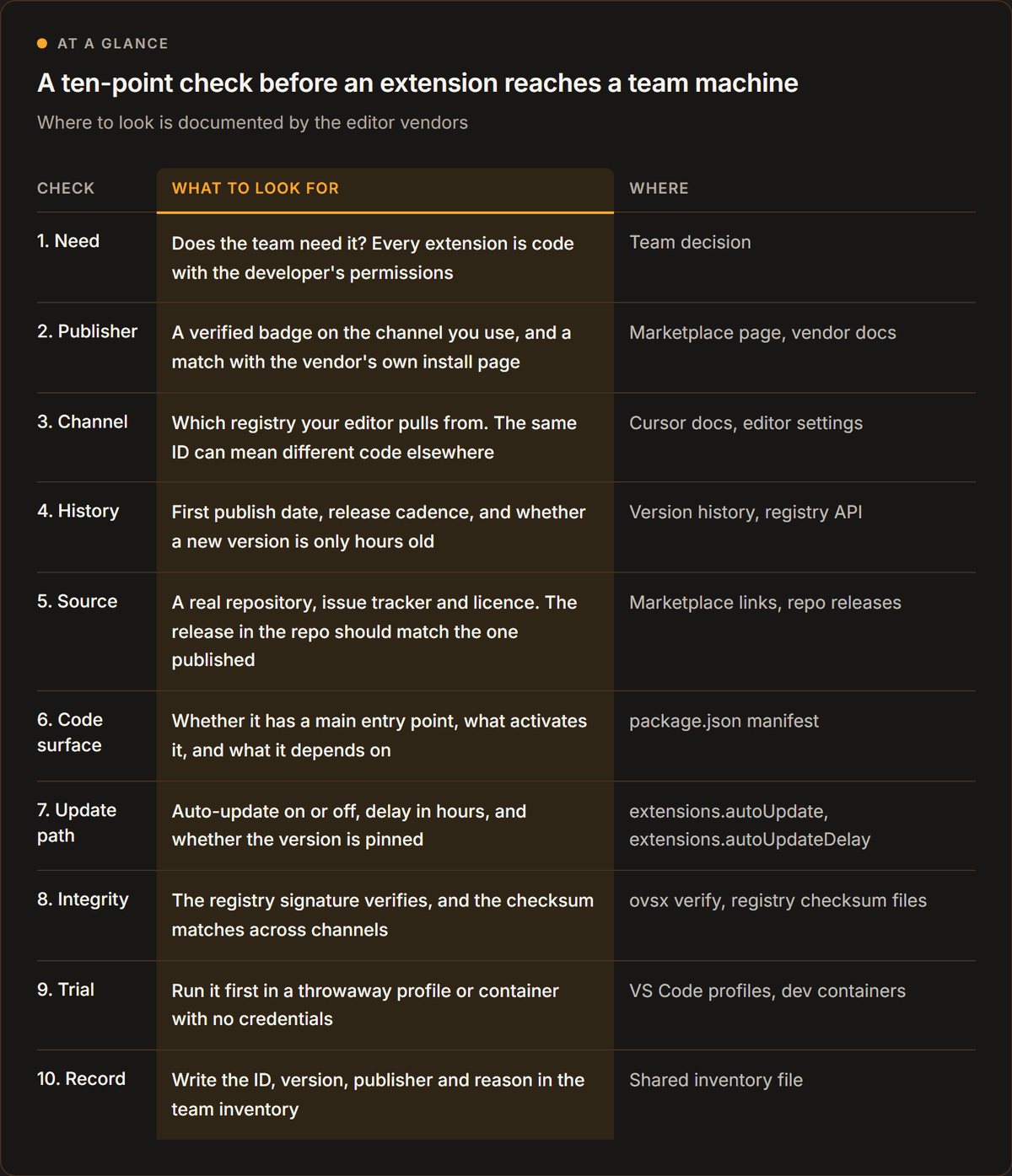
A few of these checks deserve a few extra words:
Check the channel, then the history. The Open VSX record gives you the version, publish timestamp, verified flag, download count and publishing account in one call. A release published minutes ago by an account you have never seen is a reason to wait. On Open VSX, a version is shown as verified only if its namespace has an owner and the publishing user is a member.
Look at the code surface. Themes and grammars are a smaller risk than anything that starts a process, but the risk is not zero. Wiz notes there is "no technical control preventing themes from bundling malware."
Test in a throwaway profile. VS Code's Profiles feature keeps a separate set of settings and extensions. An empty profile includes none of your customizations. For anything with real reach, a dev container goes further. Extensions are installed and run inside the container, where they reach the container's tools and file system. That is a reading of the documentation, not a vendor guarantee. Still, a loader that writes to a home directory would write to the container's, not the laptop's. The Claude Code manifest declares its kind as workspace, so it follows the workspace into a container.
Compare checksums when the stakes are high. The incident had a clean 2.1.312 and a tampered one with the same number. Registries that publish checksums let you spot that. For VSIX files you download yourself, VS Code's enterprise documentation cautions that allowlist rules use identifiers declared in the package and "do not verify the package's origin."
Read the permissions as a person. Ask what the extension would do with the whole user account if it were hostile. An AI coding assistant needs to read your code and run commands. A hostile copy can do both.

How do you enforce an extension policy across a team?
Enforce the policy in the editor, not in a wiki page. VS Code has had an extensions.allowed setting since version 1.96. Cursor supports the same setting and pushes it from an admin console or through device management. The ten-point check only works if the editor refuses anything that did not pass it.
What does VS Code let an admin control?
VS Code's enterprise extension controls let you allow or block extensions in several ways. You can go by publisher, by full extension ID, or by an exact list of versions (ranges are not supported). You can also go by platform, or by "stable" only, which blocks pre-release builds. The most specific selector wins, and "*": false blocks everything not listed. If you block an extension that is already installed, VS Code disables it. By default, all extensions are allowed.
The policy reference deploys this centrally. It works through Windows Group Policy and macOS configuration profiles. On Linux, it uses a JSON file at /etc/vscode/policy.json from version 1.106. The AllowedExtensions policy overrides the user's own setting.
Two more policies matter here. ExtensionsAutoUpdate and ExtensionsAutoUpdateDelay were added in version 1.125. The delay policy is said to help "avoid installing potentially problematic updates immediately after release."
The delay has a default. The marketplace documentation says VS Code "waits a short time after an update is published before it installs the update automatically." It sets extensions.autoUpdateDelay to 12 hours. A person who clicks Update bypasses the delay. An extension installed from a VSIX file has auto-update off by default.
What does Cursor let an admin control?
Cursor supports the same pieces and adds two of its own. Its identity and access documentation says extensions.allowed "uses an allowlist model." Once you add any entry, everything not listed is blocked, unless you add "*": true. An admin can push the setting from the team dashboard (client version 2.1 or later). They can also push it through an AllowedExtensions MDM policy, which overrides both.
Clearing the dashboard field does not reset clients. To go back to allowing everything, you push {"*": true} first.
The two additions are on Cursor's extensions page. The first is a Marketplace Install Cooldown. It lets admins defer installs and updates until a version has been public for a minimum number of hours, "a buffer against short-lived malicious uploads." Its default is 0, which means it is disabled. Above 0, it overrides each user's own extensions.installCooldownHours.
The second is that enterprise teams can require valid Open VSX extension signatures before install. Both are client-side controls that "complement, but do not replace" the marketplace's own analysis.
Cursor's security hardening page lists extension controls among its recommendations. Phorion's chief technology officer also said that extensions update automatically in Cursor by default, as relayed by The Next Web.
Which controls would have stopped this one?
Only a few would have. The honest reading is more useful than a list of features. The table is an editorial analysis, built from the vendors' documentation and the incident facts above.
| Control | Would it have stopped this incident? | Why |
|---|---|---|
| Publisher allowlist | No | The tampered builds carried the real publisher, Anthropic |
| Extension ID allowlist | No | Same ID as the genuine extension |
| Version pin | Only if pinned below 2.1.312 | A tampered 2.1.312 existed beside the genuine one, so pinning 2.1.312 is not safe |
| Update delay of 12 hours or more | Likely yes | New versions wait before they install. The arithmetic is below the table |
| Signature verification | Unknown | Depends on which key signed the tampered package, which has not been published |
| Private mirror with reviewed versions | Yes, if you review before mirroring | New versions never reach developers until someone approves them |
| Dev container with no credentials | Reduces damage | VS Code runs extensions inside the container, so a loader writes to the container's home directory |
| Inventory and monitoring | Speeds up response | You learn who is affected in minutes, not days |
Read the first rows carefully. A publisher allowlist feels like the obvious control, but it is the one that fails here. It stops a stranger's extension, not a tampered copy of a trusted one. Pinning 2.1.312 would have been a mistake, because that number existed in a good form and a bad form.
The delay arithmetic has one assumption. Cursor's reported window was 11 hours and 8 minutes, and VS Code's default delay is 12 hours. A Cursor team with a cooldown of 12 hours or more, set before 29 October, would therefore still have been holding the update when Cursor removed it. That rests on Cursor's own figures, and the setting was not tested for this article.
How do you keep an inventory without a security tool?
Use the commands the editors already provide. The VS Code command line lists installed extensions with code --list-extensions --show-versions. Run it from your device management tool. Alternatively, have each developer paste the output into a shared sheet once a quarter and after any incident like this one.
The point is the difference between what you approved and what is installed. CISA's 2021 guidance on software supply chain attacks includes the step to "monitor endpoints and/or servers for unexplained deviations from your software inventory; remove or isolate unauthorized software." The 2025 OWASP Top 10 entry on supply chain failures says you are likely vulnerable if you have no change management process for your supply chain, "including tracking IDEs, IDE extensions and updates." NIST's Secure Software Development Framework, practice PO.5.2, asks organisations to secure and harden development endpoints with a risk-based approach. You need a list, an owner and a calendar reminder.
There is one trap. The .vscode/extensions.json file in a repository only recommends extensions. VS Code prompts a user to install the recommended extensions when a workspace is first opened, so review that file like code.
What does a compromised extension mean for your code and keys?
A compromised extension runs as your developer. Assume it could read anything that developer can read, and treat the laptop, not just the editor, as compromised. Then work out what you can make less valuable before the next incident.
The Claude Code loader was small and mostly failed, which is why this incident was lucky. The Nx Console payload shows what a competent one does. According to the Nx postmortem, it harvested a long list of secrets:
- Vault, Kubernetes, AWS, npm and GitHub tokens
- An active 1Password CLI session
- SSH private keys and
.envfiles - Google Cloud application-default credentials
- Docker configuration
It then sent them out over HTTPS, the GitHub API and DNS. None of that needs a vulnerability. It needs only the permissions the extension host already grants.
The Claude Code loader maps onto standard vocabulary as follows.
| What the loader did | ATT&CK technique | Where to look |
|---|---|---|
| Added an attacker key to the user's SSH authorisation file | T1098.004, SSH Authorized Keys | ~/.ssh/authorized_keys, and administrators_authorized_keys on Windows |
| Opened an outbound reverse tunnel to the user's SSH port | T1572, Protocol Tunneling | Processes running ssh -N -R or autossh, with identity files from /tmp/.stk_* or ~/.config |
| Wrote a per-user LaunchAgent that runs at login | T1543.001, Launch Agent | ~/Library/LaunchAgents/com.apple.sysmond.plist |
| Added a boot-time cron entry or a startup task | T1053.003 and T1053.005 | User crontab on Linux, a SysMon task or Startup-folder script on Windows |
| Persisted as an IDE extension in the first place | T1176.002, IDE Extensions | The editor's extensions folder |
Microsoft's analysis supplies the first, second and fourth mappings. It labels them as behaviours "implemented or attempted," not confirmed on every host. The LaunchAgent row is an editorial addition, drawn from Phorion's artifact list and MITRE's technique page.
Apple documents why it works. At login, a per-user launchd process loads the parameters for each user agent from the property list files in that user's own Library/LaunchAgents. Phorion notes the agent "runs in the user context rather than as a root LaunchDaemon."
The tunnel is easy to misread. In OpenSSH's manual, a remote forward with port 0 means the listening port is "dynamically allocated on the server." The infected machine dials out, so a firewall that blocks inbound connections does nothing. The operator later logs in through that port using the planted key. The sshd manual says the default key file is ~/.ssh/authorized_keys, with one key per line. That is why a planted entry is easy to miss.
How do you shrink the blast radius before the next one?
You cannot prevent every compromised extension, so make a compromised developer machine less valuable. Four moves do most of the work.
- Keep long-lived credentials off the laptop. The Nx postmortem calls the GitHub CLI token "one of the highest-blast-radius credentials on a developer's machine." Wrap sensitive CLIs through a secret manager so the credential exists only for the invocation. Alternatively, use short-lived cloud credentials from single sign-on.
- Separate duties in the publishing path. For your own packages and extensions, require a second person to approve a release. Nx says any pipeline that can publish to a public registry "must require approval gating."
- Put risky work in a container or a throwaway profile. Opening an unknown repository belongs in an environment without your cloud keys. So does trying a new AI extension, and so does reviewing a contractor's pull request.
- Practise the rotation. The first time your team rotates cloud keys, source-control tokens and registry tokens for one developer should not be during an incident. Offboarding a contractor is the same exercise with a different trigger.
AI-assisted coding raises the stakes on all four. An assistant extension reads the repository and runs commands by design.
Conclusion
The tampered Claude Code builds were live on Cursor's marketplace for about 11 hours on 29 October 2026, by Cursor's account. Anthropic's own channels were not compromised. The loader was small, and its remote-access step mostly failed. This incident was a lucky one.
The lesson is not about one vendor. An editor extension runs with the full permissions of the developer, and a marketplace decides which code reaches that developer. Badges and publisher names prove identity. They do not prove that a given file is the one the publisher shipped.
Today, check whether anyone on your team updated the extension in Cursor on 29 October. Look for the svc-telemetry key, and rotate credentials from a clean machine if you find a hit.
For the longer term, enforce your policy in the editor rather than in a wiki page. An install delay would likely have blocked this incident, while a publisher allowlist would not. Keep an inventory so you can answer "who is affected?" in minutes. Keep long-lived credentials off laptops, and practise rotating them before you need to.
You cannot watch every registry fast enough, so plan for the next compromised extension. Make sure it finds as little as possible when it arrives.
How Hivemind handles engineering hires
A team can write the policy above in an afternoon. What it cannot write is the habit, and habits come from the developers you hire. How a developer treats their own toolchain predicts how they will treat yours.
You can test that in an interview. Ask a candidate to list the extensions they use daily. Then ask them to name the one they trust least. Finally, ask them to describe the last time they rotated a credential on purpose. A written rubric for the interview keeps those answers comparable between candidates. For the rest of the screen, the guide to skills-based hiring covers what to test instead of a resume line.
Hivemind is the hiring OS: manage every candidate from inbound to offer in one unified workflow. The modules closest to an engineering hire are these:
- Resumatic: AI-Powered Resume Filtering System
- Automated Skills Assessments
- Automatic Video Assessment: AI-Powered Video Interview Analysis
You can run Hivemind end to end, connect your existing tools, or mix and match both.
Frequently asked questions
Is it safe to use VS Code extensions?
Mostly yes, but every extension is code that runs with your permissions. Safety therefore depends on where you install from and how you control updates. The large studies above found suspicious behaviour in a small minority of extensions. Use a short approved list, turn on an update delay, and keep your inventory current.
Do VS Code extensions run in a sandbox?
No. The extension host has the same permissions as VS Code itself. Workspace Trust cannot stop a malicious extension from ignoring Restricted Mode. Extensions can read files, make network requests and run processes as the logged-in user.
What is Open VSX?
Open VSX is an open source extension registry run by the Eclipse Foundation. Cursor uses it for third-party extensions through its own marketplace proxy, and VSCodium defaults to it too. It has namespaces, a verified flag and publisher agreements. Since 2026, it also has pre-publish checks.
How do I see which extensions my team has installed?
Run code --list-extensions --show-versions on each machine. In a VS Code fork, run the equivalent command. Then collect the output in one sheet. A better option is to deploy the AllowedExtensions policy, so that the editor enforces the list. Review the inventory once a quarter and after any incident.
What should I rotate after a malicious extension?
Rotate everything the affected user's account could reach, and do it from a clean machine. Start with SSH keys and cloud CLI credentials. Then move on to source-control and package-registry tokens, and anything in .env files. Rotate even if the loader only reported variable names. Cursor says that does not rule out later access over the backdoor. Rebuild the machine if you cannot show what ran.
Sources
- Cursor, Security notice: malicious Anthropic.claude-code 2.1.312 and 2.1.313, 29 October 2026, updated 30 October
- Microsoft Threat Intelligence, Inside a malicious Claude Code-branded extension, 30 October 2026
- Calum Hall, Phorion, Official Claude Code Extension Compromise: Security Advisory, 30 October 2026, updated 31 October
- StepSecurity, Trojanized Claude Code extension delivered SSH backdoor, 30 October 2026, updated 1 November
- Open VSX registry API, Anthropic.claude-code 2.1.312 record, read 1 November 2026
- Microsoft, Extension runtime security, VS Code documentation, read 1 November 2026
- Microsoft, Workspace Trust, VS Code documentation, read 1 November 2026
- Microsoft, Manage extensions in enterprise environments, read 1 November 2026
- Cursor, Identity and access management, Cursor Docs, read 1 November 2026
- Microsoft, Extension Marketplace, VS Code documentation, read 1 November 2026
- Cursor, Extensions, Cursor Docs, read 1 November 2026
- The Hacker News, Official Claude Code extension on Cursor Marketplace trojanized, 30 October 2026
- BankInfoSecurity, Cursor Confirms Anthropic Claude Code Extension Compromised, 30 October 2026
- Hacker News, Backdoor in Claude Code for VS Code extension (item 50300683), 30 October 2026, read 5 November
- Open VSX registry API, Anthropic.claude-code 2.1.314 record, read 1 November 2026
- Felix Rieseberg, Anthropic, on Hacker News, Comment on item 50300683 (item 50304129), 30 October 2026
- OpenSourceMalware, Trojanized Claude Code Extension Plants an SSH Backdoor, 30 October 2026
- Hacker News, Claude Code VS Code extension with backdoor (item 50301983), 30 October 2026
- Open VSX registry API, Anthropic.claude-code 2.1.313 lookup, read 1 November 2026
- Open VSX, Checksum for Anthropic.claude-code 2.1.312 darwin-arm64, read 1 November 2026
- Ana Maria Constantin, The Next Web, Anthropic denies breach as tampered extension hits Cursor users, 30 October 2026
- The Register, Anthropic: That Claude Code extension compromise couldn't be us, 30 October 2026
- Gyana Swain, CSO Online, Cursor removes malicious Claude Code extension after SSH backdoor attempt, 2 November 2026
- Microsoft Learn, OpenSSH Server configuration for Windows, read 1 November 2026
- Microsoft, Extension Host, VS Code API, read 1 November 2026
- Microsoft, Workspace Trust Extension Guide, VS Code API, read 1 November 2026
- Open VSX registry API, Anthropic.claude-code extension record, read 5 November 2026
- Microsoft for Developers, Security and Trust in Visual Studio Marketplace, 11 June 2025
- Microsoft, Visual Studio Marketplace Terms of Use, last updated June 2021
- VSCodium, Extensions and Marketplace, read 1 November 2026
- Cursor community forum, Extension Marketplace Changes: Transition to OpenVSX, 25 June 2025
- Christopher Guindon, Eclipse Foundation, Strengthening supply-chain security in Open VSX, 28 January 2026
- Eclipse Foundation, Open VSX wiki: Namespace Access, read 1 November 2026
- Eclipse Foundation, Open VSX wiki: Publishing Extensions, read 1 November 2026
- The Hacker News, Eclipse Foundation mandates pre-publish checks for Open VSX, February 2026
- Eclipse Foundation, ovsx command line tool, README for version 1.3.0 (npm), read 1 November 2026
- The Hacker News, Critical Open VSX Registry flaw exposes developers, June 2025
- Wiz Research, Supply chain risk in VSCode extension marketplaces, October 2025
- BleepingComputer, Self-spreading GlassWorm malware hits OpenVSX, October 2025
- Jack Hsu, Nx, Postmortem: Nx Console v18.95.0 supply-chain compromise, 21 May 2026
- Edirimannage et al., Developers Are Victims Too (arXiv preprint), November 2024
- Lin, Koishybayev, Dunlap, Enck, Kapravelos, UntrustIDE: Exploiting Weaknesses in VS Code Extensions, NDSS, 2024
- Liu, Tantithamthavorn, Li, Protect Your Secrets: Data Exposure in VSCode Extensions, SANER, 2025
- Alachkar et al., VSMEx dataset of malicious VS Code extensions, CODASPY, 2026
- Stack Overflow, 2025 Developer Survey, Technology, 2025
- MITRE, ATT&CK T1176.002, IDE Extensions, read 1 November 2026
- Microsoft, Visual Studio Marketplace, Claude Code for VS Code (gallery API statistics), read 1 November 2026
- Anthropic, Use Claude Code in VS Code, read 1 November 2026
- Microsoft, Profiles in Visual Studio Code, read 1 November 2026
- Microsoft, Developing inside a Container, VS Code documentation, read 1 November 2026
- Microsoft, Enterprise policies, VS Code documentation, read 1 November 2026
- Cursor, Security hardening, Cursor Docs, read 1 November 2026
- CISA, Defending Against Software Supply Chain Attacks, April 2021
- OWASP, Top 10:2025, A03 Software Supply Chain Failures, 2025
- NIST, SP 800-218, Secure Software Development Framework version 1.1, February 2022
- MITRE, ATT&CK T1543.001, Launch Agent, read 1 November 2026
- Apple, Creating Launch Daemons and Agents, read 1 November 2026
- OpenBSD, ssh(1) manual, read 1 November 2026
- OpenBSD, sshd(8) manual, read 1 November 2026