
Recruiting today is tough and it’s less about just finding people and more about finding the right people quickly and efficiently. But with thousands of resumes, job boards, and LinkedIn profiles out there, it’s quite easy to get overwhelmed.
What if there was a simple way to cut through the noise and quickly find the exact type of candidate you’re looking for? Good news for you, because there is. It’s called Boolean search, and learning how to use it can completely change how you recruit and it only takes five minutes to learn. Boolean search recruiting empowers recruiters to refine and expand their candidate searches, making it easier to target relevant talent efficiently.
You don’t need to be technical or memorize complicated codes. Boolean search in recruitment is all about using simple connectors, words like AND, OR, and NOT, to make your search way better. By combining keywords with these connectors, you can create more precise and effective search queries that help you find the most relevant candidates.
It’s the same search bar you already use, just with a little extra power. You can use Boolean search with Google, LinkedIn, or an applicant tracking system (ATS) to help you search smarter, not harder. Advanced search techniques, including the use of all the specified keywords, can be applied to improve the recruiting process and enhance your sourcing strategy.
In this guide, you’ll learn how Boolean search in recruitment works, why it matters to recruiters, and how you can start using it immediately even if you’ve never touched it before. And yes, you can learn it in under five minutes.
Let’s break it down step-by-step.
What is Boolean Search?
Boolean search in recruitment is a structured way to find a way better search results by using a mix of keywords and logic operators like AND, OR, and NOT. Let’s think of it more as an intelligent search that helps you avoid wasting time on irrelevant results.
At its simplest, Boolean search lets you control what your search includes and what it leaves out. Instead of typing “software engineer” and hoping for the best, you can build a search like (“Software Engineer” OR “Developer”) AND (Java OR Python) NOT Junior, which finds only candidates with those job titles, skills, and experience level. Recruiters use search queries and search terms to build precise search queries, allowing them to filter results effectively and target the most relevant candidates.
The term “Boolean” comes from George Boole, a mathematician who invented this form of logic in the 1800s. But you don’t need to be a math expert to use it.
All you need to know is that Boolean search helps you be more precise when you’re digging through resumes, profiles, or databases. By leveraging complex search queries and well-defined search criteria, recruiters can improve candidate sourcing and uncover hidden talent. In summary, Boolean search in recruitment is like giving your searches a filter and a brain.
Related: What is Full Desk Recruiting? Full Guide to Role & Process
Why is Boolean Search Important to Recruiters?

Recruiters operate in a high-speed, high-stakes environment. Recruiting is much more than just filling vacant seats in the company.
You’re shaping the future of your team or your client’s company. And in a world where the best candidates are off the market in just 10 days, speed, and precision are everything. This is where Boolean search comes in handy for any recruiter.
Instead of endlessly scrolling through generic profiles or relying on algorithms that often surface the same types of candidates, Boolean search gives you control. It also helps you identify potential candidates who may not be visible through standard searches, expanding your reach to a broader and more diverse talent pool.
It allows you to build hyper-specific searches based on the skills, experiences, and qualifications that matter most to your open role.
Let’s say you’re hiring a remote React developer based in Africa with at least three of experience.
A standard search might give thousands of loosely related results. But a smart Boolean string can zero in on just the handful of candidates who truly fit, helping you find the most relevant candidates by using targeted search keywords. That means less time wasted on misaligned profiles and more time engaging the right ones.
Boolean also reduces your reliance on paid job filters or premium ATS tools. With a few keywords and logical operators, you can create custom searches on free platforms like Google or LinkedIn, surfacing hidden talent others may overlook.
If you want to hire better, faster, and more confidently, you should try Boolean search in recruitment.
The Core Boolean Search Operators You Need to Know
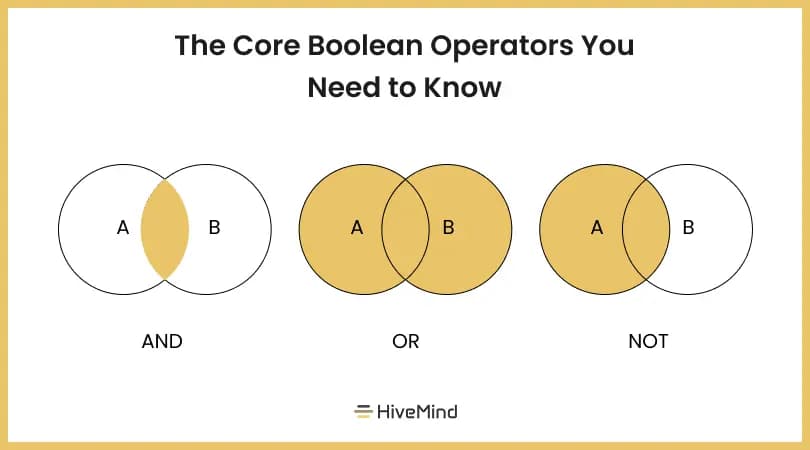
Once you know the few key tools needed to understand Boolean search, you can start crafting smarter, more specific searches almost anywhere.
These core boolean operators are shortcuts that let you tell the search engine exactly what you’re looking for. By using specified keywords and advanced boolean operators, you can further refine your searches to filter candidates by skills, experience, and qualifications, making your sourcing more precise and efficient.
Mastering boolean search techniques is essential for effective recruiting, as it enables you to identify and target the best talent across multiple platforms.
1. AND
Use this to combine two or more terms. It tells the system, “Show me results that contain all of these words.”
Example: React AND JavaScript This command helps narrow your search to candidates who have both skills listed, not just one or the other. This is perfect when you’re looking for people with multiple required qualifications. Search algorithms interpret these combinations to deliver highly targeted searches, allowing recruiters to pinpoint candidates who meet all specified criteria.
2. OR
Use this when you’re okay with either term showing up. It broadens your search to give you more possibilities.
Example: “Project Manager” OR “Product Manager” This is useful when a job title might vary across companies, or you’re open to a range of similar roles.
Recruiters often create advanced searches by saving and reusing the same search strings, adapting them for different job titles or requirements. This approach helps refine candidate pools and streamlines the process of finding qualified talent for various roles.
3. NOT (or -)
Use this to exclude certain terms as it helps out unwanted candidates.
Example: Java NOT JavaScript This is handy when similar terms could lead to unrelated results. This feature enables recruiters to filter out irrelevant profiles and achieve more relevant results by narrowing the search to only those candidates who match the exact requirements. Be cautious, though, as using NOT too much can shrink your pool too aggressively.
4. Quotation Marks (")
Use quotes around exact phrases. An exact phrase is a specific sequence of words enclosed in quotation marks, which tells the system to search for that precise wording. This is important in recruitment because it ensures your results include only candidates whose profiles match the exact job title or skill set you need. Without quotes, the system may treat each word separately.
Example: “Full Stack Developer” This keeps the phrase together, ensuring your results are highly relevant.
5. Parentheses ()
Use parentheses to group terms and control how the logic flows.
Example: (Python OR Java) AND “Data Scientist” This structure ensures you’re finding data scientists who know either Python or Java, not just profiles with random matches.
Advanced boolean searches rely on grouping logic with parentheses to build more sophisticated and effective search queries, allowing recruiters to refine results and target specific candidate profiles.
6. Asterisk (*)
The asterisk acts as a wildcard to include variations of a word, but not all platforms support this.
Example: Engineer This could return results like engineer, engineering, or engineers, which makes it great for catching different word forms with one search.
Top Pick: Automated Candidate Sourcing: 7 Tools to Find Talent Faster
Real-Life Examples for Recruiters
Now that you understand the key Boolean operators, let’s look at how you can apply them in everyday recruiting scenarios. When building Boolean search strings, recruiters define precise search criteria—such as required skills, qualifications, and experience—and often target specific job titles to ensure they find the most relevant candidates for each role.
These real life examples will show you how Boolean search strings can be used to pinpoint highly specific candidate profiles, like looking for a backend engineer in Lagos, excluding junior applicants, or searching based on education and experience.
Example 1: Finding a Backend Engineer in California(“Backend Developer” OR “Backend Engineer”) AND (Python OR Node.js) AND California
This search targets candidates who hold backend-focused titles, are skilled in either Python or Node.js, and are located in Lagos. It’s great for recruiters hiring locally in a tech hub while filtering by relevant backend technologies.
Example 2: Excluding Junior Candidates for Mid-Level Roles(“Software Engineer” OR “Developer”) AND (Java OR Kotlin) NOT Junior When hiring for mid-level or senior roles, you don’t want junior candidates crowding your search results.
This string removes profiles with the word “Junior” while still capturing essential skill sets like Java or Kotlin, and core job titles.
Example 3: Searching by Education or Work History(“Computer Science” OR “Software Engineering”) AND (Git OR Docker) AND “3 years”
Here, you’re narrowing your results to candidates with specific educational backgrounds and tool experience, while including a phrase that likely indicates an experience level (e.g., “3 years”). This is especially useful when trying to match a job description with a minimum experience threshold.
Example 4: Targeting Product-Focused Roles With Cross-Functional Skills(“Product Manager” OR “Product Owner”) AND (Agile OR Scrum) AND (“customer journey” OR “user stories”)
This string helps you find candidates in product roles who understand Agile or Scrum and have hands-on experience with customer-focused planning tools like customer journey mapping or writing user stories.
Related: 21 Out-of-the-Box Recruiting Strategies You Haven’t Tried
Example 5: Searching for Remote-First Designers(“UX Designer” OR “UI Designer”) AND (Figma OR Sketch) AND (Remote OR “Work from home”)
If you’re hiring designers who are equipped for remote work, this string pulls in those with relevant titles, popular design tools, and keywords that reflect remote flexibility.
The beauty of these examples is that you can copy, modify, and reuse them based on your unique hiring needs. Think of these Boolean strings as templates.
Swap out the technologies, titles, or locations, and you’ve got a new search that’s tailored to your exact requirement. Boolean search can also be used to optimize job ads by refining keywords and targeting, helping you attract the right candidates more efficiently.
Where to Use Boolean Search in Recruitment
The versatility of Boolean is unmatched, and one of its biggest strengths is how it can be used across a wide range of recruiting platforms. Modern recruiting tools integrate advanced search techniques, advanced searches, and advanced Boolean operators, allowing recruiters to refine and customize candidate searches with greater precision. From searching on professional networks, public websites, to internal hiring tools, Boolean logic gives you greater precision.
Below are some of the most popular platforms where Boolean search can supercharge your recruiting efforts:
-
LinkedIn Recruiter: One of the most common places to use Boolean. You can type Boolean strings directly into the search bar to find highly relevant profiles. You have to combine job titles, locations, skill, and exclusions to get laser-focused results, and advanced Boolean operators can further enhance your search precision.
-
Google (X-ray Search): You can use Booleans with Google by performing “X-ray searches” to look inside specific websites like LinkedIn or GitHub. For example, site:linkedin.com/in “Frontend Developer” AND React AND Lagos. This works well and is powerful if you’re not using LinkedIn Recruiter and want to find open profiles via public search. Advanced search techniques, such as X-ray searches, are essential for sourcing passive candidates.
-
Job Boards (Indeed, Glassdoor): Most job boards support basic Boolean operators. You can narrow down posted resumes or candidate profiles by using search strings that include role-specific and skill specific terms. Some platforms also offer advanced searches with filters and custom fields as part of their search features.
-
Applicant Tracking Systems (ATS): Many ATS platforms, like Greenhouse or Lever, allow recruiters to search through resume databases using Boolean syntax. This is especially useful when dealing with high application volumes, and advanced search features help streamline the process.
-
Resume Databases and CV Libraries: Hired, AngelList, Stack Overflow are all platforms that also allow Boolean style filters. If you’re sourcing from niche communities, Boolean can help you filter, and advanced search features provide even more detailed customization.
These search features not only improve candidate targeting but also contribute to a more efficient recruitment process by streamlining hiring workflows and enhancing overall recruiting outcomes.
See Also: Effective Candidate Engagement: 7 Real-Life Examples
Advanced Boolean Search Techniques for Recruiters
Once you’ve mastered the basics of Boolean search, it’s time to take your candidate searches to the next level with advanced Boolean search techniques. These strategies allow recruiters to craft complex Boolean search strings that deliver highly targeted search results, helping you zero in on the most suitable candidates for any role.
One of the most effective advanced Boolean search techniques is using quotation marks to search for exact phrases. For example, searching for “senior software engineer” ensures you only see profiles with that exact job title, rather than scattered mentions of each word. Parentheses are another powerful tool, letting you group keywords and operators to control the logic of your search—perfect for combining multiple skills or job titles in a single query.
The NOT operator is invaluable for excluding specific keywords that might clutter your search results with irrelevant candidates. For instance, if you’re looking for a software engineer but want to avoid junior-level applicants, you can use NOT junior to filter them out.
To further refine search results, recruiters can leverage site-specific searches. By using the site: operator in search engines like Google, you can target candidate searches to specific websites, such as LinkedIn, GitHub, or industry-specific platforms. For example, site:linkedin.com/in “data scientist” AND Python will only show LinkedIn profiles matching your criteria.
File type searches are another advanced Boolean search technique, especially useful when sourcing resumes or portfolios. By adding filetype:pdf or filetype:doc to your search string, you can find candidate resumes directly from the web.
Proximity searches, available on some platforms, let you find candidates where specific keywords appear close together in the text—ideal for identifying profiles where skills and job titles are mentioned in the same context.
Mastering these advanced Boolean search techniques takes practice, but the payoff is huge: more precise search results, less time spent sifting through irrelevant profiles, and a much higher chance of finding the right candidates for your open roles.
Benefits of Boolean Search in Recruitment
While Boolean search might seem like a small adjustment to how you use a search bar, it comes with big payoffs, especially in recruiting. Boolean search recruiting enables talent professionals to identify relevant candidates more efficiently by refining and expanding search results across multiple platforms. Here are some key benefits that make it a must have for talent professionals.
-
Saves time: By using Boolean operators, recruiters can quickly filter out unqualified profiles and focus on the most relevant candidates.
-
Improves precision: Boolean search allows for highly targeted queries, ensuring you only see candidates who match your specific requirements.
-
Expands reach: With advanced search techniques, such as Boolean logic, recruiters can uncover hidden talent that may not appear in standard searches, maximizing the pool of potential hires.
1. Increased Precision
Boolean allows you to narrow your search results to exactly what you’re looking for by using precise search queries and specified keywords. By using the right combination of keywords and operators, you reduce noise and irrelevant profiles, which means you spend less time reviewing unsuitable candidates.
2. Faster Time-to-Hire
When you can instantly identify the best fit candidates, your hiring process moves faster. No more digging through piles of resumes or clicking through endless pages of search results. Boolean search in recruitment cuts straight to the profiles that actually matter.
3. Cost Efficiency
Instead of relying heavily on expensive premium search tools or job boards, you can use free platforms like Google and LinkedIn more effectively. Boolean search in recruitment lets you maximize what you already have without always upgrading your tech stack.
4. Better Candidate Experience
Because you’re spending less time on mismatched profiles, you can focus more on quality engagement with the right candidates. That means faster responses, better communication, and a smoother recruitment journey for the people who matter most.
5. Uncovering Hidden Talent
Many great candidates don’t use common job titles or might be working in less obvious industries. Boolean search in recruitment helps you uncover this “hidden” talent by expanding your reach beyond simple keyword matching, using search algorithms and complex search queries to identify candidates who might otherwise be missed.
6. Customizability for Every Role
Boolean search in recruitment can be customized for any role, any skill set, and any location—whether you’re hiring a marketing intern or a senior DevOps engineer—by tailoring your search terms and search keywords to create precise Boolean queries. The flexibility it offers makes it useful across industries and hiring needs.
Best Practices for Boolean Search in Recruitment
To truly harness the power of Boolean search in recruitment, it’s essential to follow a set of best practices that ensure your search results are both relevant and comprehensive. Start by clearly defining the requirements of your job opening and identifying the most relevant keywords, job titles, and skills. Use these to build a Boolean search string that combines logical operators and modifiers for maximum precision.
Always test and refine your search string. Run a few searches, review the results, and tweak your Boolean search techniques as needed to filter out irrelevant candidates and surface the most qualified ones. Don’t forget to utilize applicant tracking systems and resume databases—these tools often support advanced Boolean search techniques and can help streamline your candidate searches across multiple platforms.
Keep your search strings organized and up-to-date. As job descriptions and market trends evolve, so should your search parameters. Regularly review and adjust your Boolean search strings to ensure you’re always targeting the best candidates.
Incorporate alternative job titles and relevant keywords to expand your reach. For example, if you’re searching for a “software engineer,” consider adding “developer,” “programmer,” or specific programming languages to your search string. Use proximity searches when possible to find candidates whose skills and experience are closely related within their profiles.
Leverage exact match searches with quotation marks to find candidates with specific skills or experience, and use logical operators like AND, OR, and NOT to combine or exclude keywords as needed. This approach helps you refine your search results and avoid missing out on qualified candidates due to variations in job titles or terminology.
By following these best practices and continuously optimizing your Boolean search in recruitment, you’ll improve the quality and efficiency of your candidate searches—ensuring you find the most relevant, qualified candidates for every role.
Common Mistakes to Avoid in Boolean Search
Even though using Boolean gets easier once you get the hang of it, many recruiters still fall into common traps that make their searches less effective or even counterproductive. Here’s a breakdown of mistakes to watch out for:
Not using quotation marks for exact phrases: Without quotes, the search treats each word as a separate entity. For example, when you search for Project Manager without quotes, it might bring up candidates who worked on “projects” or held a “manager” title in unrelated roles. Using “Project Manager” keeps the phrase intact.
Overusing “NOT”: While it’s useful to exclude irrelevant results, going overboard with NOT can shrink your candidate pool too aggressively. You may end up filtering out strong candidates who only mention a certain technology or term.
Forgetting parentheses in complex queries: When combining multiple ANDs and ORs, parathesis are very important. They control how the system processes your logic, and without them, your string can return messy, inconsistent results. Advanced boolean operators require careful structuring with parentheses to ensure you get relevant results that match your intended search.
Too many ORs without structure: Stacking too many ORs without grouping them properly can confuse the search tool and dilute your results. Always group OR statements in parentheses.
Ignoring platform-specific quirks: Boolean search works differently on different platforms. For example, Google may handle symbols like asterisks differently than LinkedIn or your ATS. It is always worth it to check each platform’s documentation.
Using too broad of a search string: If you use overly generic terms, you’ll be overwhelmed with low-quality or unrelated candidates. Defining clear search criteria—such as specific skills, qualifications, or experience—helps you filter and narrow down your results for more targeted outcomes. Add layers of specificity, like location, skills or industry keywords, to refine your search.
Use Boolean with HiveMind
Boolean search, on its own, is powerful but it becomes even better when paired with AI recruiting tools like Hivemind AI. You can combine Boolean strings with AI-based candidates ranking to zero in on top matches faster, cutting screening time dramatically. Advanced Boolean searches—using complex operators, proximity searches, and parentheses—along with robust search features such as custom fields and filters in AI platforms, further enhance the precision and efficiency of candidate sourcing and improve recruiting outcomes.
If you are tired of sifting through unqualified resumes manually, try feeding your Boolean logic into an AI platform like HiveMind and it’ll do all the heavy lifting.
Conclusion
Boolean search is one of those recruiting hacks that is easy to ignore until you try it and wonder why it took you so long to use.
It’s fast, it’s effective, and it helps you take back control over your searches.
You don’t need any special skills or certification to get started. All you need is to remember a few operators and think clearly about what you’re looking for. Boolean search helps you surface the right profiles, cut through the noise, and make hiring faster and smarter.
FAQs on Boolean Search in Recruitment
1. What are 5 common Boolean searches?
AND, OR, NOT, quotation marks (“”), and parentheses () are five common Boolean operators used to refine candidate searches. These operators help recruiters build effective search queries to target specific job titles and create highly relevant candidate lists.
2. What is Boolean search in hiring?
Boolean search in hiring uses specific operators to find resumes or profiles that match certain criteria on platforms like LinkedIn or job boards.
3. How to find candidates using Boolean search?
Use Boolean strings like “frontend developer” AND React on job platforms to filter profiles with specific skills and job titles.
4. What is an example of a Boolean search?
An example is: “software engineer” AND Python NOT junior – this finds profiles with Python skills but excludes junior roles.
5. How to write a Boolean search?
Combine keywords using AND, OR, NOT, quotation marks, and parentheses to build targeted search strings. Mastering Boolean search techniques is essential for recruiters to efficiently identify and source the best candidates.
6. Is Boolean just yes or no?
In logic, yes, Boolean means true or false, but in recruitment, it refers to using logic operators to search smarter.