

When you post a job opening today, you are immediately flooded with resumes, slowed down by admin tasks, and you’re under pressure to move fast. These admin tasks often include time consuming tasks that drain resources and slow the entire recruitment process.
As a result, roles stay open longer, good candidates drop off, and recruiters burn out.
Research shows that recruiters spend over 80% of their time on repetitive tasks like sorting resumes, sending emails, scheduling interviews, and the likes. These tasks require significant manual effort and do not improve candidate quality or speed up hiring.
They only make the process heavier and harder to manage, often leading to job seekers experiencing delays or poor communication, which negatively impacts their engagement and increases candidate drop-off.
The good news is that it can be fixed. Recruitment process automation helps you remove the manual work and focus on better hiring decisions, while also delivering a professional candidate experience by improving communication and reducing delays.
In this guide, we will show you how to automate your recruitment process step by step using HiveMind. Whether you are hiring at scale or just want to reduce admin work, this process will help you build a faster and smarter hiring system.
What Is Recruitment Process Automation?
Recruitment process automation is the use of technology to handle repetitive hiring tasks. A recruitment automation platform is an integrated solution that brings together various recruitment software tools to automate and optimize the entire hiring workflow.
These tasks include resume screening, candidate outreach, interview scheduling, or even status updates. Instead of doing these steps manually, recruitment software powers automation tools to complete them faster and with fewer errors.
It is not the same as just having an ATS (Applicant Tracking System) or using robotic process automation (RPA).
This process goes further by connecting your hiring tools and workflows into one system, enabling automated processes that streamline recruitment and reduce errors. This makes it easier for you to manage all your hiring needs.
What’s the Difference Between Recruiting Automation Software and Recruitment Automation?
Most people use the terms ‘recruiting automation software’ and ‘recruitment automation’ interchangeably, but there are slight differences in how they are used.
Recruiting automation software usually refers to the actual tools or platforms that help you automate hiring tasks. More broadly, ‘recruiting software’ encompasses a range of solutions designed to streamline and automate various stages of the hiring process, including candidate engagement, structured workflows, and integration with other HR systems. It is a product-focused term, often used by software providers or buyers looking for specific solutions.
Recruitment automation, on the other hand, describes the overall strategy or process of using automation to improve how hiring is done. This is often referred to as ‘hiring automation’—the process of streamlining and enhancing recruitment workflows by automating repetitive tasks and supporting more efficient candidate engagement. It focuses more on outcomes such as faster hiring, fewer errors, and better candidate experiences, than on individual tools.
In practice, both terms point to the same goal: making hiring faster, smarter, and more efficient by reducing manual work and supporting the broader talent acquisition objectives of the organization.
However, understanding both terms helps you choose the right tools and frame your strategy clearly, especially when communicating with stakeholders from HR, IT, or leadership.
Top Pick:35+ Most Hilarious Recruitment Memes
Benefits of Automating the Recruitment Process
Automating your recruitment process offers clear, measurable advantages. Here are the key benefits:
-
Faster time-to-hire: AI automates most parts of the recruiting process, and 67% of decision-makers say its biggest benefit is saving time. By automating repetitive tasks, you reduce delays and fill roles faster.
-
Higher-quality candidates: Smart filtering and skill-based ranking help you focus only on qualified applicants who match your job requirements.
-
Reduced bias: Unilever boosted diversity by 30% through recruitment automation. Automated screening follows preset rules. This removes human bias from early-stage decisions and supports fairer hiring.
-
Better candidate experience: PwC found that 49% of jobseekers have rejected job offers after a negative experience, often due to poor communication, friction, or lack of support. Automating the recruitment process means applicants get quicker responses, smoother scheduling, and clearer communication throughout the process. Automation tools like chatbots, email campaigns, and scheduling software also improve candidate engagement by ensuring timely, consistent communication and reducing manual follow-up.
-
Lower recruiter workload: Recruiters said scheduling interviews alone eats up 35% of their time! Automation frees your team from repetitive admin tasks, allowing them to spend more time decision-making. Automation also helps in maintaining candidate engagement throughout the process by using tools such as email templates, drip campaigns, and AI assistants to keep candidates informed and engaged at every stage.
-
Stronger team collaboration: Centralized platforms ensure recruiters and hiring managers stay aligned at every stage. Tools like HiveMind enable shared dashboards, role-specific workflows, and real-time updates.
When done right, the benefits of automating the recruitment process are immediate and long-term. It creates a smoother, faster and more consistent hiring experience across every role, while enabling organizations to scale hiring efficiently without sacrificing quality.
Building a Consistent Recruitment Process
A consistent recruitment process is the backbone of effective and fair hiring. Recruitment automation tools make it easy to standardize every step, from job posting to candidate screening and interview scheduling. By automating these routine tasks, hiring managers can ensure that every applicant is evaluated using the same criteria, reducing the risk of bias and creating a level playing field for all candidates.
Recruitment automation software also streamlines the hiring process, allowing hiring managers to focus on high-impact activities—like engaging with promising candidates and making informed hiring decisions—rather than getting bogged down in repetitive admin work. With automated interview scheduling and candidate screening, your team can move candidates through the pipeline efficiently and consistently, no matter how many roles you’re filling.
By leveraging automation tools, organizations can build a recruitment process that is not only fair and transparent but also scalable and repeatable. This leads to higher-quality hires, improved candidate experiences, and better recruitment outcomes across the board.
How to Automate Your Recruitment Process with HiveMind AI
Recruitment process automation is not about replacing recruiters. It is about giving them a hiring workflow that works from start to finish without juggling five different tools.
HiveMind AI was built as the first fully customizable hiring platform, meaning you can design your recruitment pipeline exactly how you want it, even if you have never used automation before. Automation helps manage candidate pipelines efficiently, from initial sourcing to final hiring decisions, ensuring every candidate is tracked and nurtured throughout the process. Features like candidate relationship management support ongoing engagement and communication with both active and passive candidates, strengthening your long-term talent pool. Here’s how you can set it up step by step, starting with how automation streamlines candidate sourcing to build a strong talent pool.
Step 1: Create a Hiring Pipeline
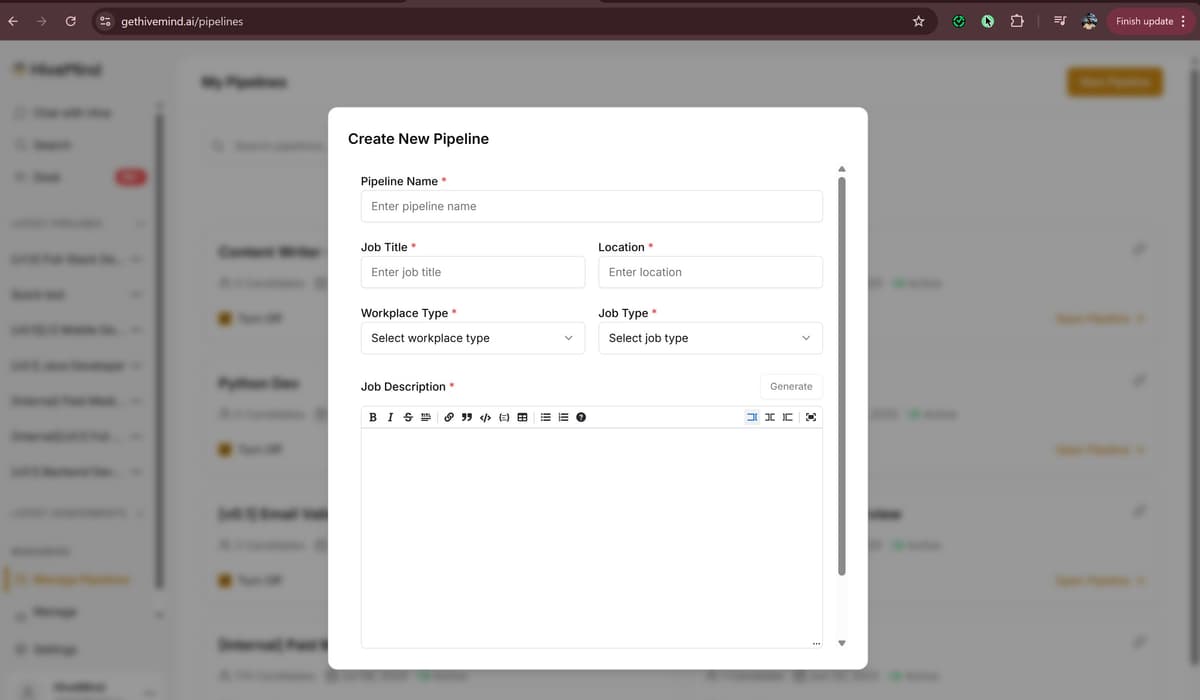
To begin your recruitment process automation, start by logging into HiveMind and creating a new pipeline. A pipeline is basically your digital roadmap for hiring and represents the hiring funnel, guiding candidates through each stage from application to offer.
On HiveMind, there are templates you can use right away, or if you prefer to, you can build your own from scratch. You can also decide what stages to include, how candidates move through them, and what checkpoints are required.
Step 2: Define Your Role Requirements
Inside your pipeline, add the details for the role: job title, responsibilities, skills, required experience, job criteria, and job descriptions.
HiveMind makes it easy to create role‑specific workflows, so you are not locked into a generic template. If you are hiring for multiple roles, you can create separate pipelines and run them side by side.
Step 3: Publish Your Job Opening
Every pipeline comes with a shareable link you can post on LinkedIn, job boards, or your company site, making posting job openings across multiple channels fast and efficient.
At the same time, HiveMind uses recruitment process automation to distribute job openings automatically to a wide range of platforms, including social media platforms like LinkedIn, ensuring your job openings reach a broader audience. You don’t have to manually post the same job in ten different places.
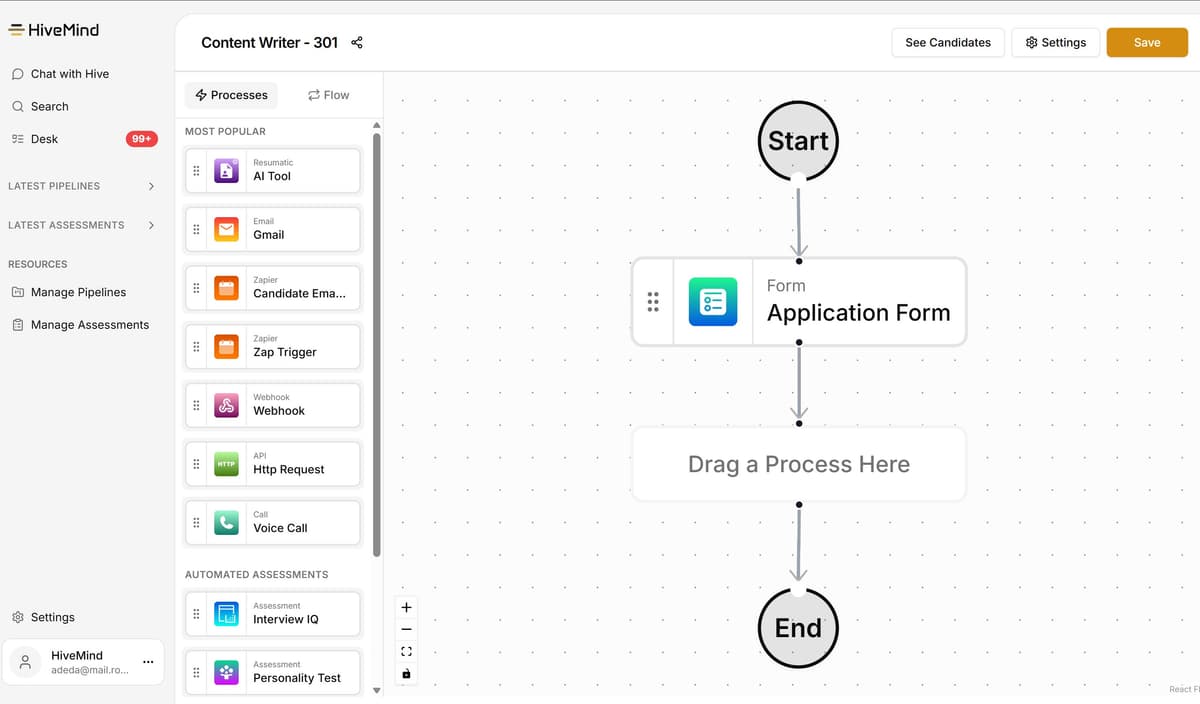
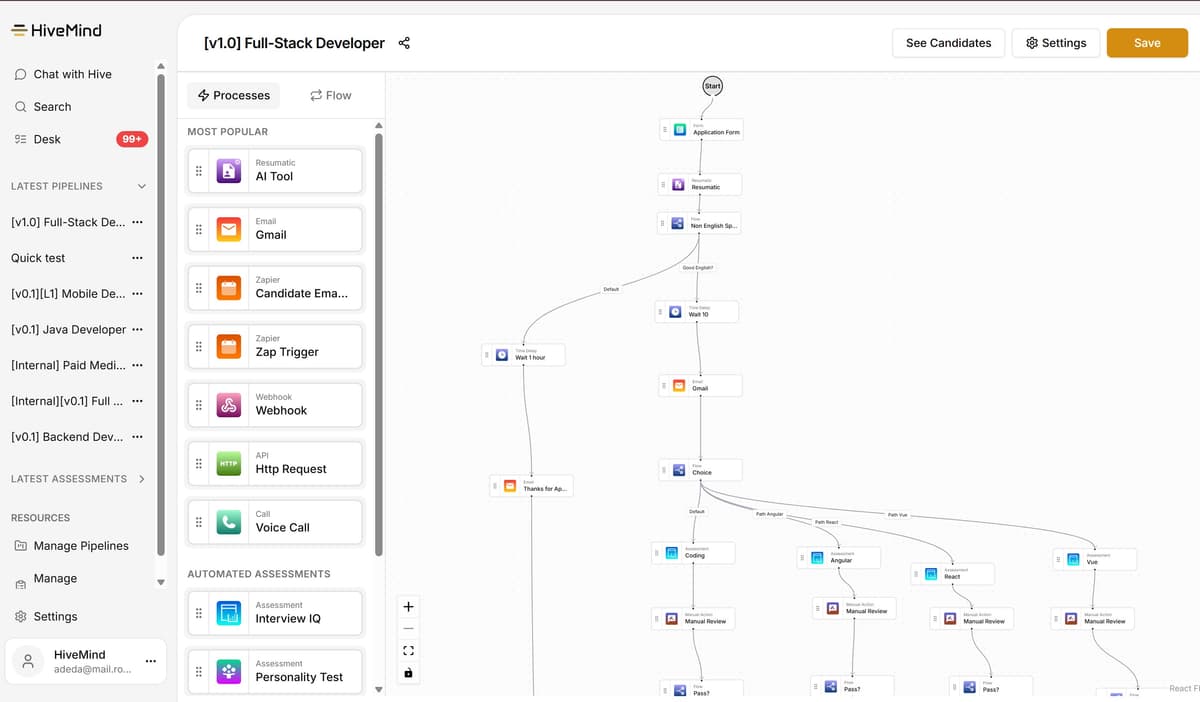
Step 4: Drag and Drop Processes
From the sidebar, you’ll see modules like Resumatic (for resume screening), InterviewIQ (for interview scheduling), automated Email Sequences, Skill Assessments, and automated task assignments for candidate follow-ups and approvals.
These tools are all part of HiveMind’s recruitment process automation system. Simply drag and drop them into your pipeline in the order you want candidates to follow, enabling a fully automated recruitment process.
What a new workflow looks like on HiveMind
What a customized workflow looks like on HiveMind
Step 5: Automate Resume Screening with Resumatic
Once candidates start applying, HiveMind’s Resumatic engine reviews each resume against the criteria you set. Resume parsing technology is used to extract and analyze candidate data, enabling automated screening of resumes to improve efficiency. Instead of sorting through every application, you see a clear ranking of who best fits the role.
If you want, you can adjust the weight of certain skills. For example, prioritizing coding experience over years of management.
Step 6: Add Skill-Based Assessments
HiveMind offers thousands of skill-based tests (e.g. coding assessments). You can drag and drop any of these into your pipeline. Choose from coding, problem-solving, language, or job-specific tasks.
No technical setup is required. This way, every candidate is tested fairly and consistently.
Step 7: Set Up Automated Candidate Emails
Good candidates drop off when they feel ignored. HiveMind prevents this by letting you create branded, automated emails for each stage.
You can confirm applications, send interview invites, and follow up with feedback automatically.
Step 8: Schedule Interviews Seamlessly
HiveMind integrates with Google Meet and Zoom through InterviewIQ. Candidates choose available time slots from your calendar, and the system books the meeting instantly.
Automation streamlines the interview process for both recruiters and candidates by organizing scheduling, reminders, and follow-ups. Interviewing candidates becomes more efficient thanks to automated scheduling and reminders, allowing hiring teams to focus on evaluation rather than logistics.
You and the candidate both receive reminders, reducing no-shows.
Step 9: Use Hive Copilot During Interviews
When you start an interview, Hive Copilots quietly join in the background. They take structured notes, highlight key moments, and generate a summary, so you can focus on the conversation, not your keyboard.
As part of HiveMind’s recruitment process automation, all notes are automatically saved to the candidate’s profile for your team to review.
Step 10: Run AI-Powered Video Assessments
For roles where soft skills matter, HiveMind lets candidates record short video responses.
The system analyzes communication style, confidence, and clarity, giving you insights you might miss in a resume. This is especially useful for client-facing or leadership roles.
Step 11: Collaborate With Your Team in Real Time
You can invite hiring managers, recruitment managers, and team members to join the pipeline. Hiring teams can work together efficiently—everyone can view candidate profiles, leave comments, and tag each other with feedback.
No need to juggle shared spreadsheets or email threads. Collaboration happens inside HiveMind, streamlining the recruitment team’s workflow.
Step 12: Track Results and Improve
HiveMind’s analytics dashboard shows how your pipeline is performing. You can see the number of applicants, where drop-offs happen, and how long it takes to fill each role. Integration with your human resources information system enables comprehensive data management across recruitment and HR processes. Automated tracking and reporting features also support compliance management by ensuring all necessary documentation and legal requirements are met.
These insights help you refine your process and make better hiring decisions in the future.
Hiring Process Optimization
Optimizing your hiring process is essential for attracting top talent and staying competitive in today’s fast-paced job market. Recruitment automation platforms are designed to streamline every stage of the hiring process by automating manual tasks and creating efficient, automated workflows. This reduces time to hire and ensures that recruiters can focus on what matters most: finding and engaging the best candidates.
With recruitment automation, you can quickly identify and eliminate bottlenecks in your process, refine your job postings, and enhance candidate screening criteria to improve candidate quality. Automated workflows also ensure that candidates receive timely updates and communications, which helps maintain engagement and reduces the risk of losing top talent to slow or inconsistent processes.
By continuously optimizing the hiring process with real-time analytics and insights, organizations can reduce recruitment costs, improve candidate quality, and deliver a seamless experience for both recruiters and applicants.
Real Example:
RocketDevs, a top staffing agency, used HiveMind’s recruitment process automation to build a customized pipeline for their engineering hires and to better manage candidates at every stage. Here’s what they’ve achieved:
-
20,000+ interviews per month, fully automated
-
52% faster time-to-hire
-
80% reduction in cost per hire
-
3x stronger candidate signal
-
Significant increase in qualified candidates identified through automation
Key Features of Recruitment Automation Software
The right software should cover every stage of hiring, from finding candidates to making final decisions. HiveMind brings these features together in one clean interface so you don’t have to switch between multiple tools.
Here are the key modules to look for:
-
Automated Resume Screening: Can it filter and rank candidates based on skills, qualifications, and experience? HiveMind’s Resumatic engine reviews applications instantly, ensuring only the most relevant candidates move forward.
-
Outreach and Candidate Communication: Consistent communication keeps candidates engaged. A good tool automates emails for application confirmations, interview invites, and follow-ups.
-
Application Process Automation: Streamline the application process to reduce candidate drop-offs and improve candidate experience through automated communication and engagement at every stage.
-
Interview Scheduling: A good tool should sync with your calendar, allowing candidates to choose from available time slots. Recruitment process automation makes this easier by eliminating back-and-forth communication and reducing no-shows.
-
Skill and Role-Based Assessments: Are there tests that let you evaluate candidates for technical, behavioral, and cognitive skills?
-
Real-Time Collaboration: Is there a feature to invite team members to review candidates, leave feedback, and make decisions? You would need everyone to stay aligned without separate spreadsheets or endless email chains.
-
Analytics and Reporting: HiveMind tracks key hiring metrics such as time-to-hire, candidate satisfaction, and conversion rates. Dashboards give you the insights needed to refine your hiring process.
-
Onboarding Processes Automation: Automate onboarding processes such as offer generation, document management, background checks, and preboarding tasks to ensure a smooth, organized transition from candidate selection to new hire integration.
By combining resume screening, communication, assessments, scheduling, collaboration, analytics, and onboarding in one place, HiveMind sets itself apart as a complete recruitment process automation software.
Related: The Best 9 Candidate Assessment Tools, Ranked by Accuracy
Implementation and Best Practices
Successfully implementing recruitment automation software starts with a clear strategy. Begin by defining your goals—whether it’s reducing time to hire, improving candidate quality, or streamlining communication. Next, select automation tools that align with your hiring needs and integrate smoothly with your existing systems.
Training is key: ensure hiring managers and recruiters are comfortable using the new recruitment automation software and understand how to leverage its features for maximum impact. Monitor key hiring metrics such as time to hire, candidate satisfaction, and source of hire to track progress and identify areas for improvement.
Establish a governance framework to maintain compliance with regulations and protect candidate data. Regularly review your processes and automation tools to ensure they continue to meet your organization’s needs. By following these best practices, you’ll maximize the benefits of recruitment automation and build a high-performing, data-driven hiring function.
When Should You Invest in Recruitment Automation?
Recruitment automation is most valuable when your current hiring process can no longer keep pace with your business needs. While every company grows at a different rate, there are clear signs that it is time to invest in recruitment process automation:
-
You’re hiring 5 or more roles each month
-
Your team is scaling rapidly
-
High turnover is draining resources
-
You receive too many unqualified applicants
If you recognize one or more of these challenges, recruitment automation is no longer optional. It’s the key to staying competitive, keeping your recruiters focused, and ensuring candidates have a positive experience at every stage.
Common Misconceptions About Recruiting Automation
-
“It’s only for enterprise.”
Recruitment automation is just as effective for small and mid-sized teams. With customizable workflows in HiveMind, even a team of two can manage hiring at scale. -
“It removes the human touch.”
Automation handles repetitive tasks, not relationship-building. HiveMind ensures recruiters spend more time engaging with candidates while the system manages scheduling, screening, and updates. -
“It’s too expensive or hard to learn.”
Modern tools are designed for ease of use. HiveMind’s drag-and-drop interface allows you to build a full hiring pipeline without technical knowledge, and its pricing is scalable for teams of any size.
FAQs About Recruiting Automation
1. What is recruitment automation?
Recruitment automation is the use of software to handle repetitive hiring tasks such as resume screening, candidate communication, interview scheduling, and assessments. The goal is to speed up hiring, reduce errors, and improve candidate experience.
2. What is the best recruitment automation software?
The best recruitment automation software depends on your hiring volume and goals. HiveMind is a strong choice because it combines resume screening, assessments, interview scheduling, and analytics in one customizable platform.
3. Can I get recruitment automation software for free?
Some platforms offer free plans with limited features, but most advanced recruitment process automation software requires a paid plan. HiveMind provides scalable pricing options, so small teams and large enterprises can both benefit.
4. What is the difference between an ATS and recruitment automation?
An Applicant Tracking System (ATS) mainly stores candidate information and tracks applicants through the pipeline. Recruitment automation goes further by adding resume ranking, skill-based assessments, automated outreach, and analytics for a more efficient process.
Future of Recruitment Automation
The future of recruitment automation is being shaped by rapid advances in artificial intelligence, machine learning, and natural language processing. These technologies are powering a new generation of automation tools that can analyze complex candidate data, simulate human-like conversations, and even predict which candidates are most likely to succeed.
As recruitment automation becomes more sophisticated, expect to see greater adoption of AI-powered solutions for high volume hiring, as well as more personalized candidate experiences driven by real-time insights. Automation tools will play a crucial role in supporting remote and virtual hiring, enabling organizations to scale their recruitment efforts globally while maintaining a professional and engaging candidate experience.
By embracing these innovations, organizations can stay ahead of the curve—leveraging recruitment automation to attract, assess, and hire top talent faster and more effectively than ever before.
Conclusion
Recruitment process automation is no longer optional for teams that want to hire faster, reduce manual work, and attract stronger candidates. With HiveMind, you gain all the benefits: faster time-to-hire, higher candidate quality, reduced bias, and a smoother experience for both recruiters and applicants: in one easy-to-use platform.
You can design your own hiring workflows, drag and drop the tools you need, and manage every step of the process.
Transform your hiring today. Start your free trial with HiveMind or book a live demo to see how it works.